LED Display Grayscale: What Buyers Need to Know
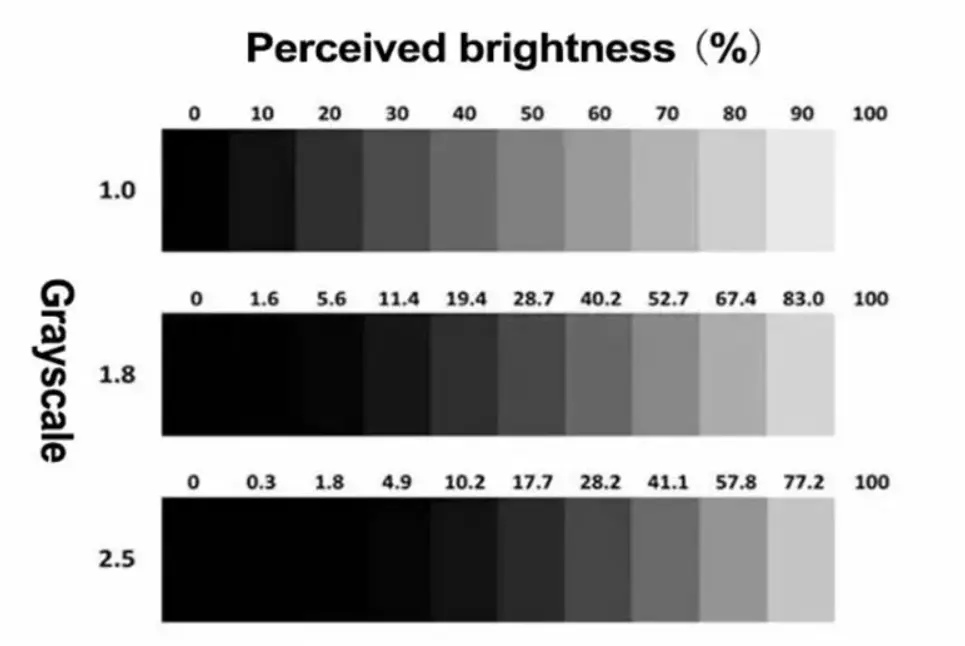
LED display grayscale describes how many brightness levels a screen can reproduce between black and its maximum output. It directly affects shadow detail, smooth gradients, and the way images look in dark scenes. Although 14-bit and 16-bit grayscale are common technical reference points, a higher bit-depth specification does not automatically guarantee better picture quality. The driver IC, PWM control, video processor, scanning configuration, and calibration all influence the result.
For LED display buyers, the real challenge is identifying whether a specification represents usable image performance or simply a number on a datasheet. A screen may advertise high grayscale and refresh-rate figures but still show color shifts, crushed shadows, or visible banding at low brightness. These problems are particularly noticeable in fine-pitch installations, control rooms, broadcast environments, and other applications where image detail matters. Evaluating the complete display system—not one specification in isolation—is the more reliable way to make a purchasing decision.
What Does Grayscale Actually Control on an LED Screen?
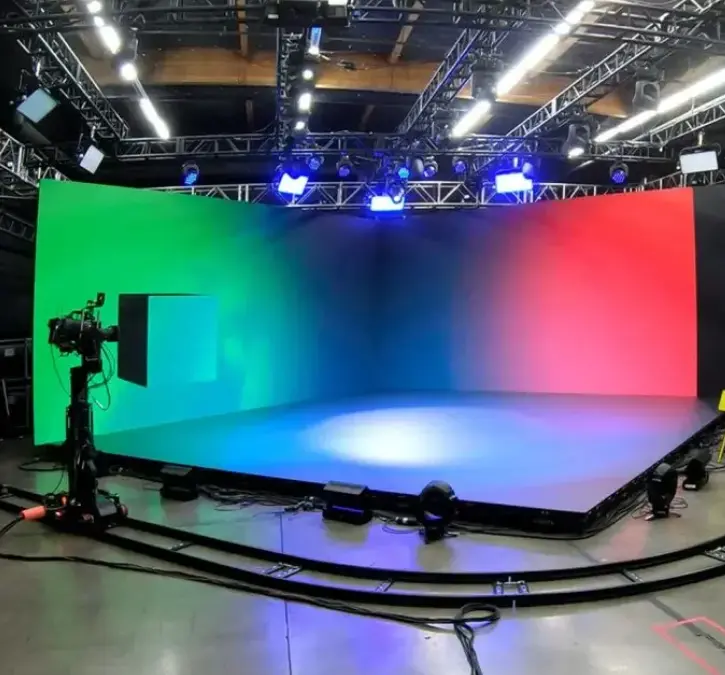
Grayscale is the range of brightness levels an LED pixel can reproduce between its darkest state and its brightest state. Each red, green, and blue LED channel has brightness information, and the display system combines these channels to produce the final image.
When grayscale control works well, the screen can show subtle differences between dark gray and black, preserve detail in shadows, and display smooth transitions in photographs and video. When it works poorly, those transitions may look like separate blocks, dark areas may lose detail, or neutral gray tones may develop unwanted color tints.
This is why grayscale matters even when a display is already bright enough. Maximum brightness determines how much light the screen can produce; grayscale determines how finely it can control brightness across the image.
Grayscale Is Not the Same as Brightness or Contrast
These terms are often used together in LED display specifications, but they describe different aspects of image performance.
| Specification | What it describes | Why buyers should care |
|---|---|---|
| Grayscale | The available brightness gradations | Affects shadow detail and smooth transitions |
| Brightness | The light output of the display | Determines visibility under ambient light |
| Contrast ratio | The difference between the brightest and darkest image areas | Influences perceived image depth |
| Color depth | The number of digital values available to represent color information | Affects tonal precision and color gradation |
| Refresh rate | How frequently the displayed image is updated | Matters for motion and camera-facing applications |
| Gamma | How digital image values are mapped to displayed brightness | Influences how light and dark tones appear |
A display can have high brightness but poor low-gray performance. It can also support a high refresh rate without reproducing every dark tonal transition accurately. Buyers should therefore evaluate these specifications as a connected system rather than treating them as interchangeable measures of quality.
How Many Grayscale Levels Can an LED Display Produce?
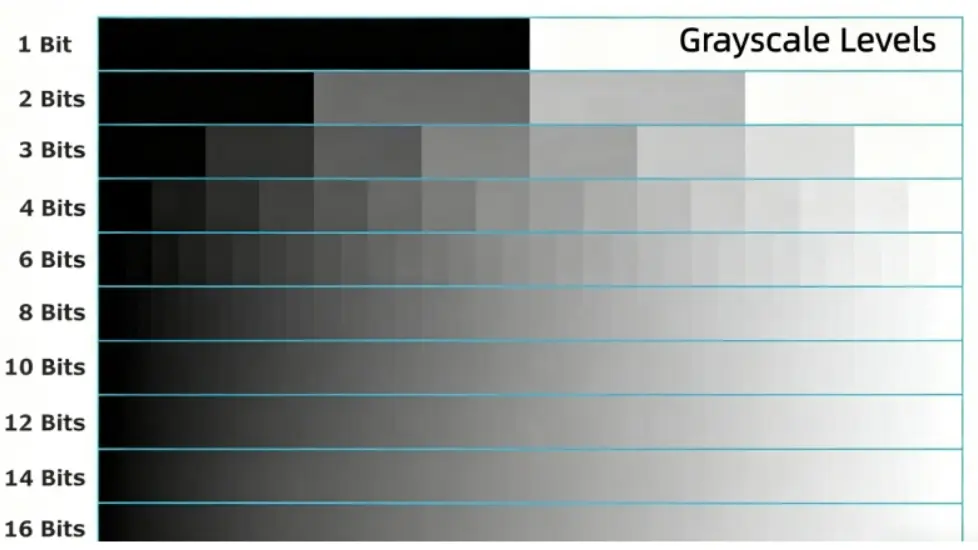
The number of theoretical grayscale levels depends on the bit depth used to represent each color channel. More bits provide more possible digital brightness values, giving the display system greater potential precision.
| Bit depth per channel | Theoretical grayscale levels |
|---|---|
| 8-bit | 256 |
| 10-bit | 1,024 |
| 12-bit | 4,096 |
| 14-bit | 16,384 |
| 16-bit | 65,536 |
These figures describe the theoretical digital levels available to a channel. They do not mean that every level will appear as a separately distinguishable brightness step on a physical LED display.
The difference matters. A video source may provide high-bit-depth content, but the video processor, receiving card, driver IC, and LED output stage must all handle the signal appropriately. If one part of the chain reduces precision or cannot reproduce the requested output consistently, the final image may not benefit from the original bit depth.
The Signal Chain Determines Effective Grayscale
An LED display does not generate grayscale in isolation. Image information passes through several components before the LEDs produce visible light.
| Component | Main responsibility | Potential limitation |
|---|---|---|
| Video source | Supplies image and color information | Low-bit-depth source content may already contain banding |
| Video processor | Scales, processes, and maps image signals | Processing or output settings may reduce tonal precision |
| Receiving system | Transfers image data to display modules | Configuration and compatibility affect signal delivery |
| LED driver IC | Controls LED output according to grayscale data | Driver architecture affects low-gray control and stability |
| LED modules | Convert electrical output into visible light | LED variation and manufacturing consistency affect uniformity |
| Calibration system | Adjusts brightness and color consistency | Poor calibration can leave visible differences between modules |
A useful purchasing question is therefore not simply, “How many grayscale bits does this screen support?” Ask instead: “What bit depth does the complete display system support, and how does it perform at the brightness level we will actually use?”
How PWM Controls LED Display Grayscale
Pulse Width Modulation (PWM) is a widely used method for controlling LED brightness. Rather than continuously reducing the LED’s operating current to create every brightness level, PWM controls how long the LED is switched on during a defined period.
A longer on-time produces a higher average light output, while a shorter on-time produces a lower average output. By adjusting this timing according to image data, the driver system creates different brightness levels.
The principle is straightforward, but implementing it across a high-resolution, multi-scan LED display requires careful timing and signal management.
What the LED Driver IC Does
The LED driver IC is one of the key components responsible for translating grayscale data into controlled LED output. It manages channel operation and current regulation, while its PWM architecture determines how brightness levels are generated.
Different driver ICs support different grayscale modes, scanning arrangements, output-current ranges, and image-quality functions. Some also include technologies designed to improve low-gray refresh performance or reduce common visual artifacts.
For example, Macroblock’s official product documentation lists different grayscale capabilities and features across its driver families. Its MBI5292 documentation specifies S-PWM modes up to 19-bit and identifies functions addressing low-gray color shifts and non-uniformity. The MBI5756 documentation lists up to 16-bit S-PWM and features intended for fine-pitch LED applications. These are product-specific capabilities, not a guarantee that every display using those chips will achieve identical results.
Technical references:
Why GCLK and Scanning Configuration Matter
GCLK, or grayscale clock, is part of the timing system used by the driver to generate PWM grayscale output. Its relationship with grayscale depth, scanning, and the driver’s internal architecture affects how the display schedules LED output.
Scanning is another important part of the design. Many LED displays use multiplexing, in which rows or groups of LEDs are activated in sequence rather than all being driven continuously at the same time.
A specification such as 1/16 scan describes the scanning arrangement. It does not directly state the display’s grayscale depth or refresh rate.
The important point is that grayscale depth, PWM timing, scan ratio, and refresh performance are interdependent. A configuration designed to support more grayscale levels must still maintain stable image output under its intended operating conditions.
Why Low-Gray Performance Is Where Weak Displays Get Exposed
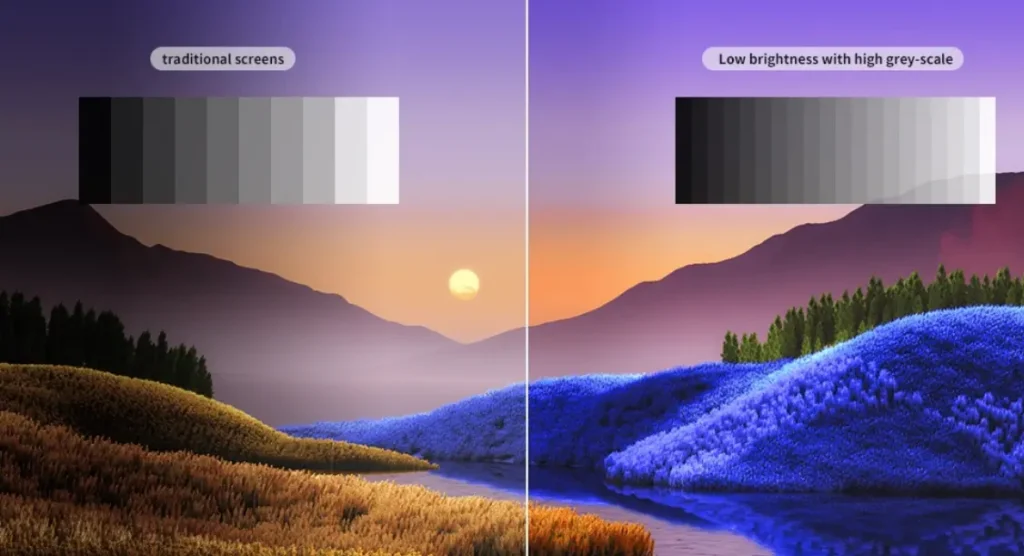
A display may look impressive when showing bright promotional images. The weaknesses often appear when the content becomes darker.
Low-gray performance describes how well the screen reproduces subtle brightness differences near black. It is especially important for dark video scenes, night photography, shadow areas, and content containing gradual tonal transitions.
Poor low-gray performance can appear in several ways:
- Crushed shadows: Dark gray details disappear into black.
- Color shifts: Neutral gray areas develop a red, green, or blue tint.
- Visible banding: Smooth gradients appear as separate brightness steps.
- Low-gray flickering: Dark areas show unstable brightness.
- Uneven dark areas: Different parts of the screen reproduce similar gray values differently.
- Ghosting or unwanted lines: Certain scanning and driving conditions create visible artifacts.
These problems are not necessarily caused by one component. Source content, video processing, driver architecture, module consistency, and calibration can all contribute.
Why Color Shifts Appear at Low Brightness
LED channels do not always behave identically across their full operating range. At very low output levels, small differences in LED characteristics and drive behavior can become more noticeable.
For example, a neutral gray image should look neutral. If the red, green, and blue channels do not maintain the intended balance at low brightness, the gray area may appear tinted.
Driver manufacturers have developed different approaches to address this problem. Macroblock’s MBI5292 documentation, for instance, identifies Low Gray Color Shift Removal as one of its image-quality functions. This demonstrates why the exact driver architecture can matter, although actual performance still needs to be checked on the finished display.
Calibration Helps, but It Cannot Fix Everything
Calibration adjusts the output of individual modules or display areas to improve brightness and color consistency. It is important for large LED walls, where small differences between cabinets can become visible across the full screen.
However, calibration is not a substitute for suitable hardware. It cannot turn an unsuitable driver into a high-performance driver or restore image information that has already been lost in the source signal.
A sound display design combines appropriate LED components, stable driver control, consistent manufacturing, and a properly configured calibration process.
14-Bit vs. 16-Bit Grayscale: Is the Difference Visible?
A 16-bit system provides more theoretical grayscale values than a 14-bit system. That additional digital precision can be useful when the rest of the display system can process and reproduce it.
But buyers should be careful about treating the bit-depth number as a direct measure of visible quality.
| Comparison | 14-bit grayscale | 16-bit grayscale |
|---|---|---|
| Theoretical levels per channel | 16,384 | 65,536 |
| Available digital gradation | Lower | Higher |
| Potential tonal precision | High | Higher |
| Actual low-gray stability | Depends on the complete system | Depends on the complete system |
| Visual improvement | Can be excellent with suitable hardware and calibration | May improve subtle transitions when fully supported |
| Purchasing priority | Verify real image performance | Verify real image performance and implementation |
A properly designed 14-bit display can produce smoother and more consistent images than a poorly implemented 16-bit display. This is particularly relevant when comparing products from different manufacturers, because the advertised bit depth may refer to a specific driver mode rather than the complete display’s effective performance.
Which Grayscale Specification Should Buyers Choose?
The answer depends on the content, viewing environment, and camera requirements.
- Indoor fine-pitch displays: Prioritize smooth dark gradients, color consistency, and low-gray stability.
- Control rooms: Pay attention to shadow detail and consistent reproduction of maps, dashboards, and monitoring interfaces.
- Broadcast and virtual production: Evaluate grayscale alongside refresh behavior and camera compatibility.
- Outdoor billboards: Consider grayscale together with brightness, visibility, and performance at normal operating settings.
- Rental LED displays: Check whether cabinets maintain consistent image quality across different configurations and brightness levels.
Instead of paying extra for a higher bit-depth number without verification, ask the manufacturer to demonstrate the display using the content and operating conditions relevant to your project.
How to Test LED Display Grayscale Before Buying
A datasheet is useful, but a visual inspection can reveal problems that a specification table may not explain. Ideally, test a complete cabinet or display wall with the intended video processor, receiving system, and operating settings.
Start with a Black-to-White Gradient
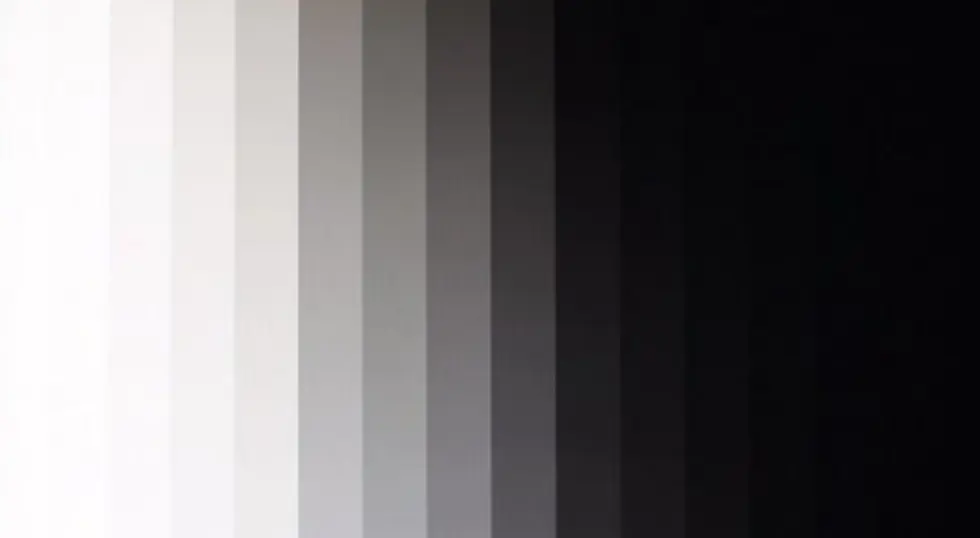
Display a smooth gradient from black through dark gray and mid-gray to white. Look for abrupt transitions, visible stripes, or areas where the image changes brightness unevenly.
A good result should show gradual transitions without obvious banding. Pay particular attention to the dark end of the gradient, where weak low-gray performance is often easier to identify.
Test at the Intended Operating Brightness
Do not evaluate the display only at maximum brightness. Reduce it to the level expected in the actual installation and repeat the grayscale test.
Check whether dark details remain visible, neutral gray areas retain their color balance, and the image remains stable. For indoor applications, the relevant test is the normal room setting. For outdoor applications, assess the screen under its expected operating conditions.
Check Driver IC and Refresh Specifications
Ask the supplier for the exact driver IC model and its official technical documentation. Confirm the supported grayscale modes, PWM features, scanning arrangement, and refresh-rate capabilities.
A high refresh-rate figure should not be treated as proof of high grayscale performance. Refresh rate and grayscale describe different aspects of display operation, even though their implementation can be related.
Inspect Full-Screen Uniformity
Look across module and cabinet boundaries. Check for dark patches, brightness differences, and color inconsistencies in neutral gray content.
A single module may look good on a workbench while a larger installation reveals differences between cabinets. This is why full-screen inspection and calibration records are valuable during product approval.
LED Grayscale Inspection Checklist
| Test item | What to inspect | Warning sign |
|---|---|---|
| Black-to-white gradient | Smooth tonal transitions | Visible banding |
| Dark-gray pattern | Shadow detail | Crushed blacks |
| Reduced brightness | Low-gray stability | Flickering or color shifts |
| Neutral-gray image | RGB balance | Unwanted color tint |
| Full-screen uniformity | Module and cabinet consistency | Bright or dark patches |
| Camera test | Image stability during recording | Flicker or scan artifacts |
| Technical documentation | Driver and processing specifications | Unclear or unsupported claims |
For camera-facing applications, use the actual camera, frame rate, shutter settings, and display configuration planned for production. A screen that looks stable to the naked eye may behave differently when recorded.
How LED Grayscale Requirements Change by Application
Not every LED installation needs the same balance of brightness, grayscale, refresh performance, and uniformity. The right specification depends on how the screen will be viewed and what it will display.
Indoor Fine-Pitch LED Displays
Indoor fine-pitch displays are used in control rooms, conference spaces, broadcast studios, and corporate environments. Because viewers may sit close to the screen, subtle image defects can become more noticeable.
Dark user interfaces, maps, and video content often contain large areas of similar but slightly different gray values. Good low-gray performance helps preserve these details without obvious banding or color shifts.
Buyers should assess the screen at normal indoor brightness and viewing distance, rather than relying solely on a maximum-brightness demonstration.
Explore Sostron small-pitch LED display solutions for applications that require close-viewing image detail.
Outdoor LED Displays and Billboards
Outdoor LED displays must remain visible under changing ambient light conditions. Brightness is important, but image quality still depends on how consistently the screen reproduces colors and tonal transitions.
Buyers should evaluate grayscale alongside daylight visibility, brightness uniformity, color consistency, and long-term operating conditions. A high grayscale specification is useful only when the display can maintain stable output in its intended environment.
See Sostron outdoor LED displays for outdoor installation options.
Rental LED Displays and Virtual Production
Rental LED displays are used at concerts, exhibitions, corporate events, and temporary installations. Virtual production environments add another requirement: the display may be captured by professional cameras rather than viewed only by an audience.
For these applications, check low-gray reproduction, cabinet consistency, refresh behavior, and camera compatibility. A practical test should use the actual camera and production settings whenever possible.
COB LED Displays and Grayscale
Chip on Board (COB) is an LED packaging approach in which LED chips are mounted directly onto a substrate and covered by a protective layer. It can offer advantages in packaging and surface protection, depending on the product design.
However, COB technology does not automatically provide higher grayscale performance. The driver IC, PWM architecture, processing system, LED characteristics, and calibration remain important.
When comparing COB and SMD products, buyers should evaluate the complete display rather than assuming that the packaging method alone determines image quality.
For more information, explore Sostron COB LED display solutions.
How LED Materials, Manufacturing, and Design Affect Grayscale Quality
Grayscale performance begins with the electronic control system, but the physical construction of an LED display also influences the consistency of the final image.
A display is made up of many LEDs, driver components, circuit boards, modules, power systems, and cabinets. Small variations across these parts can become visible when hundreds or thousands of modules work together as one screen.
LED Chips and Color Binning
LED chips can vary in brightness and wavelength. Manufacturers use binning processes to group components with similar optical characteristics.
Consistent LED selection helps reduce visible differences between pixels and modules. If the red, green, and blue components vary significantly, neutral gray images may appear inconsistent even when the digital input values are identical.
Binning does not increase the driver’s grayscale bit depth. Its role is to improve the consistency of the physical light output.
Driver ICs and PCB Design
The driver IC controls LED output, while the PCB provides the electrical connections and signal paths needed by the module.
A well-considered PCB design supports reliable power distribution and signal transmission. Component layout, electrical design, and thermal conditions all need to be considered during product development.
Driver selection should also match the pixel pitch, scanning arrangement, and intended application. A driver suitable for one display architecture may not be the best choice for another.
Thermal Management and Cabinet Structure
LED characteristics can change with operating temperature. Heat management therefore matters for stable operation and long-term consistency.
The cabinet and module structure should provide appropriate mechanical support and allow the display to operate within its intended thermal conditions. For outdoor products, environmental protection and structural design become additional considerations.
These factors do not directly create more grayscale levels, but they can affect the stability and consistency of the image over time.
Calibration and Quality Control
Manufacturing consistency is only part of the process. The finished modules and cabinets also need appropriate inspection and calibration.
A practical quality-control process may include checking LED appearance, electrical function, module uniformity, cabinet assembly, and final display performance. Calibration then helps reduce visible differences across the screen.
For buyers, the important question is whether the supplier can explain how these processes are handled and provide relevant product or inspection documentation.
A Real Project Reference: 8 × 6 m Outdoor LED Billboard
An outdoor billboard project provides a useful example of why grayscale should be evaluated as part of a complete LED display specification rather than in isolation.
In a Sostron outdoor billboard project, the supplied project details included an 8 × 6 m display area, a total screen area of 48 m², an Ares 3 product configuration, P6.25 pixel pitch, and SMD packaging. The listed cabinet or module specification was 1,280 × 960 mm, with a stated 3,840 Hz refresh rate.
These details help define the physical display configuration and one aspect of its operating performance. However, the refresh-rate figure alone does not establish the display’s grayscale bit depth or prove a particular low-gray performance result. Those claims would require the relevant driver IC documentation, system configuration, and grayscale test records.
For a project of this scale, the approval process should therefore look beyond pixel pitch and refresh rate. Buyers should also request a black-to-white gradient demonstration, low-brightness inspection, cabinet uniformity checks, and confirmation of the driver and processing configuration.
The lesson is simple: a large outdoor screen must be evaluated as a complete engineered product. Its display area, pixel pitch, brightness, refresh behavior, grayscale control, cabinet construction, and installation requirements all contribute to the final result.
Why Choose Sostron for LED Display Solutions?
Choosing an LED display manufacturer involves more than comparing pixel pitch and price. Buyers also need to understand the company’s manufacturing capabilities, engineering support, product range, and ability to match a display configuration to the project.
Sostron is a Shenzhen-based LED display manufacturer with experience in developing display solutions for different commercial and professional applications. Its product portfolio covers indoor, outdoor, fine-pitch, rental, and COB display categories.
For a grayscale-sensitive project, the right approach is to assess the complete configuration before production: the LED components, driver IC, control system, module design, cabinet structure, and calibration requirements. This helps ensure that the selected display is suited to its actual viewing environment rather than chosen on a single headline specification.
Sostron’s manufacturing and R&D capabilities support product development and project customization. For buyers, the value lies in discussing application requirements with a manufacturer that can consider both the display’s technical configuration and its practical installation conditions.
Before confirming an order, buyers should request the relevant driver documentation, product specifications, and a display demonstration using representative content. This creates a clearer basis for comparing suppliers and approving the final solution.
Frequently Asked Questions About LED Display Grayscale
Is 16-bit grayscale better than 14-bit grayscale?
16-bit grayscale provides more theoretical digital brightness levels than 14-bit grayscale. However, the visible improvement depends on the driver IC, video processor, signal chain, low-gray control, and calibration. A well-designed 14-bit display can outperform a poorly implemented 16-bit system.
What does 65,536 grayscale mean?
It refers to the theoretical number of digital brightness values available in a 16-bit grayscale channel. It does not guarantee that all 65,536 levels will appear as individually distinguishable brightness outputs on a physical LED display.
Does grayscale affect LED display brightness?
Grayscale and brightness are related but different. Brightness describes the screen’s light output, while grayscale describes how finely it can control brightness levels. A display can have high maximum brightness but still struggle to reproduce subtle dark tones.
What causes grayscale banding on an LED screen?
Banding can result from limited source bit depth, video-processing limitations, driver behavior, low-gray control problems, or inconsistent calibration. The source content and complete display signal chain should be checked before attributing the issue to one component.
What is low-gray performance?
Low-gray performance describes how accurately and consistently an LED display reproduces brightness levels close to black. It affects shadow detail, dark scenes, and subtle tonal transitions. Poor performance may appear as crushed blacks, color shifts, flickering, or uneven dark areas.
Does a higher refresh rate mean better grayscale?
No. Refresh rate and grayscale describe different aspects of display operation. A high refresh rate may be important for motion and camera-facing applications, but it does not independently prove smooth grayscale reproduction. Both should be evaluated under the intended operating configuration.
How can I test LED display grayscale before buying?
Use a black-to-white gradient, dark-gray test patterns, and neutral-gray images. Check the display at its intended operating brightness and inspect the entire screen for banding, color shifts, flickering, and module differences. Ask the supplier for the exact driver IC model and relevant technical documentation.
Does COB technology improve grayscale?
COB is a packaging technology, not a grayscale-control method. It may provide packaging and surface-protection advantages, but grayscale performance still depends on the LED driver, signal processing, control system, and calibration.
Choose an LED Display Based on Real Image Performance
LED display grayscale is not just a number in a product specification. It reflects how well the complete display system reproduces subtle brightness differences, preserves shadow detail, and maintains consistent image quality.
For buyers comparing LED displays, the most useful approach is to check the driver IC, signal-processing configuration, low-gray behavior, refresh performance, module consistency, and calibration together. A practical demonstration under the intended operating conditions is more informative than relying on bit depth alone.
Sostron develops LED display solutions for indoor, outdoor, fine-pitch, rental, and other commercial applications. If you are planning an LED display project, share your pixel pitch, screen dimensions, viewing distance, installation environment, and content requirements so the display configuration can be evaluated against the actual application.
Explore Small-Pitch LED Display Solutions
For control rooms, meeting spaces, and close-viewing environments, explore Sostron small-pitch LED displays to compare product options for detailed image applications.
Explore COB LED Display Solutions
If surface protection and LED packaging are important to your project, visit Sostron COB LED display solutions to learn more about the technology and available configurations.
Contact Sostron to discuss your LED display requirements and request a project-specific solution.
References:
Basic Properties of Digital Images — Florida State University
Time-Multiplexed PWM LED Driver With Grayscale Enhancement Techniques for Signage Display — IEEE