If you need to calculate LED screen resolution, the basic formula is straightforward, but a professional LED project requires more than dividing screen dimensions by pixel pitch. Start with the physical screen width and height, convert them into millimeters, and divide each dimension by the pixel pitch:
Calculation Formula
| Calculation | Formula |
|---|---|
| Horizontal resolution | Screen width (mm) ÷ Pixel pitch (mm) |
| Vertical resolution | Screen height (mm) ÷ Pixel pitch (mm) |
| Total pixels | Horizontal pixels × Vertical pixels |
For example, a 5 m × 3 m LED display using P2.5 has a theoretical resolution of approximately 2,000 × 1,200 pixels, or 2.4 million pixels. However, this is a theoretical calculation. The actual native resolution must also be checked against the LED module, cabinet dimensions, cabinet pixel resolution, and final cabinet arrangement.
That distinction matters when you are specifying an LED wall for a commercial project. A system integrator, DOOH operator, event company, or corporate buyer should not select an LED display simply because its calculated resolution looks high. The correct specification must connect pixel pitch, physical dimensions, viewing distance, native resolution, content resolution, and video processing.
What Is LED Screen Resolution and Why Does It Matter?
LED screen resolution refers to the number of physical pixels that make up an LED display horizontally and vertically. It is normally expressed as a format such as 1920 × 1080, 2560 × 1440, or 3840 × 2160.
Unlike a conventional LCD monitor, an LED video wall is assembled from multiple modules and cabinets. Its resolution therefore depends on the physical pixel arrangement across the entire display.
For B2B buyers, resolution matters for three main reasons:
- It determines how much image detail the display can physically reproduce.
- It affects how well digital content matches the screen.
- It influences pixel pitch, viewing distance, cabinet configuration, processing requirements, and project cost.
A higher pixel count is not automatically the best purchasing decision. A large outdoor billboard viewed from dozens or hundreds of meters away may not need the same pixel density as a P1.5 indoor conference-room display.
What Does LED Screen Resolution Mean?
Consider a display with a native resolution of 1920 × 1080.
The first number represents the horizontal pixel count, while the second represents the vertical pixel count:
1920 × 1080 = 2,073,600 physical pixels
This is commonly referred to as Full HD resolution.
For an LED display, however, you should verify whether those pixels are actually present on the physical screen. A video processor may accept a 4K input signal, for example, while the LED wall itself has a lower native resolution.
This creates an important distinction:
Input resolution ≠ native LED resolution.
A professional specification should always identify the physical resolution of the LED display separately from the resolution of the video source.
What Is the Difference Between Resolution, Pixel Pitch and Pixel Density?
These three terms are closely related but describe different characteristics.
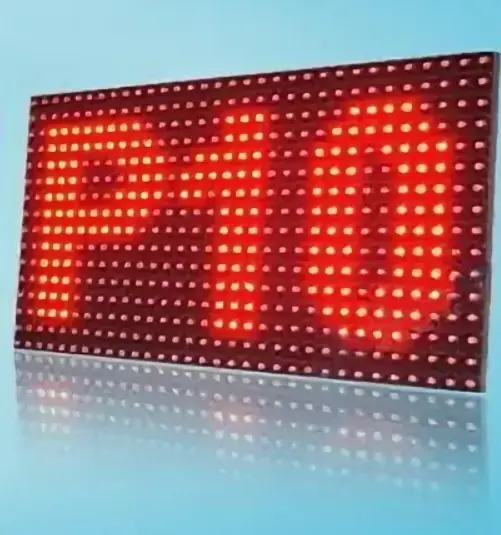
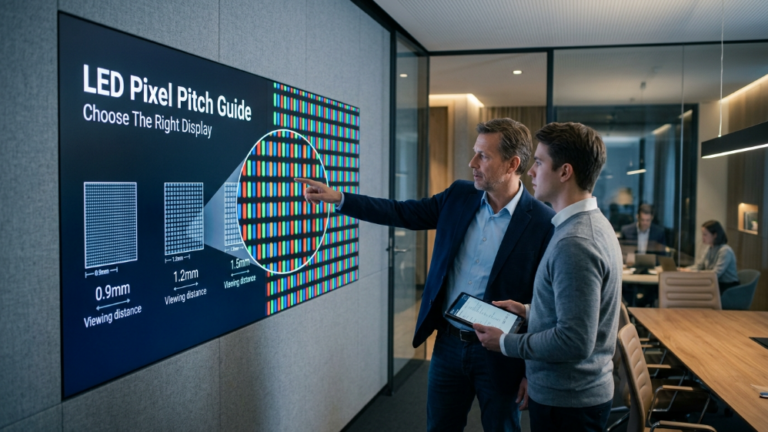
Pixel pitch is the center-to-center distance between adjacent LED pixels, normally measured in millimeters. A P2.5 display has approximately 2.5 mm between pixel centers.
Pixel density describes how many pixels are packed into a given physical area, commonly expressed as pixels per square meter.
Resolution describes the total horizontal and vertical pixel dimensions of the complete display.
In general, reducing pixel pitch increases pixel density. If the physical screen size remains unchanged, a smaller pixel pitch also produces a higher native resolution.
For example, consider the same 5 m × 3 m display:
| Pixel Pitch | Approx. Horizontal Pixels | Approx. Vertical Pixels |
|---|---|---|
| P5 | 1,000 | 600 |
| P3.9 | 1,282 | 769 |
| P2.5 | 2,000 | 1,200 |
| P1.5 | 3,333 | 2,000 |
These figures demonstrate why pixel pitch is one of the most important specifications when calculating LED screen resolution.
Why Native Resolution Matters for B2B LED Display Projects
Native resolution tells you what the LED wall can physically display without relying on additional pixel creation through scaling.
Suppose a project requires a large visual canvas for presentations, advertising, or live video. If the source content is 3840 × 2160 but the LED wall has only 1920 × 1080 physical pixels, the processor must scale the input to fit the display.
The screen can still show the 4K content, but it does not become a native 4K LED display.
This difference is particularly important for:
- Corporate meeting rooms
- Control rooms
- Premium retail displays
- Broadcast environments
- XR virtual production
- Large-format digital signage
Before approving an LED specification, buyers should therefore ask the supplier for the native pixel resolution, not simply the maximum supported input resolution.
How to Calculate LED Screen Resolution Step by Step
The simplest method is to calculate the horizontal and vertical pixel counts independently.
Step 1: Measure the LED Screen Width and Height
First determine the actual physical dimensions of the proposed LED display.
For accurate calculations, use millimeters because LED pixel pitch is also normally specified in millimeters.
For example:
Screen width = 5 m = 5,000 mm
Screen height = 3 m = 3,000 mm
Do not mix meters and millimeters in the same calculation. A unit mismatch can produce a result that is off by a factor of 1,000.
Step 2: Identify the Pixel Pitch
Next, identify the LED display’s pixel pitch.
Assume the selected display is P2.5, meaning the pixel pitch is approximately:
2.5 mm
The smaller the pitch, the more physical pixels can fit into the same screen area.
This is why a P1.5 LED wall can deliver considerably more pixel detail than a P5 wall of identical dimensions.
Step 3: Calculate Horizontal and Vertical Pixels
Use these two formulas:
Horizontal Resolution = Screen Width ÷ Pixel Pitch
Vertical Resolution = Screen Height ÷ Pixel Pitch
For a 5,000 mm × 3,000 mm P2.5 LED display:
Horizontal resolution = 5,000 ÷ 2.5 = 2,000 pixels
Vertical resolution = 3,000 ÷ 2.5 = 1,200 pixels
Therefore, the theoretical native resolution is:
2,000 × 1,200 pixels
Step 4: Calculate the Total Pixel Count
Once the horizontal and vertical pixel counts are known, multiply them:
2,000 × 1,200 = 2,400,000 pixels
The complete display therefore contains approximately 2.4 million physical pixels.
This calculation is useful for estimating pixel density, processing requirements, content specifications, and overall system architecture.
Step 5: Verify the Actual Cabinet Configuration
This is where a basic online calculator stops and professional LED engineering begins.
An LED display is normally assembled from standardized modules and cabinets. The final screen dimensions may therefore need to follow fixed cabinet dimensions rather than an arbitrary measurement.
For example, if a cabinet contains 256 × 192 pixels, installing five cabinets horizontally and four vertically produces:
256 × 5 = 1,280 horizontal pixels
192 × 4 = 768 vertical pixels
The resulting native display resolution is:
1,280 × 768 pixels
Therefore, when purchasing a commercial LED display, calculate the theoretical resolution first, but verify the final resolution from the manufacturer’s actual module and cabinet specifications before placing the order.
How Does Pixel Pitch Affect LED Screen Resolution?
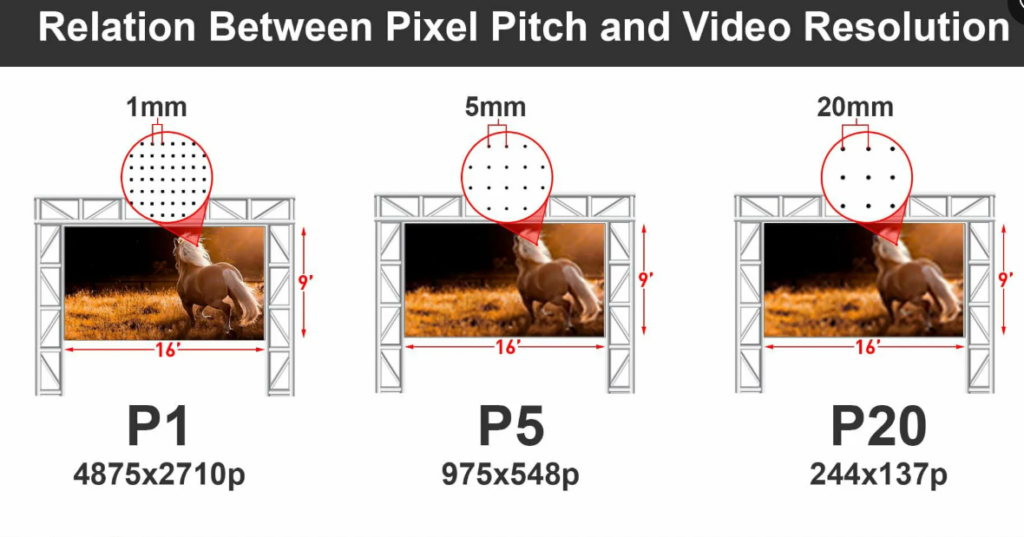
Pixel pitch is one of the most important variables in an LED screen resolution calculation. It determines how closely the physical pixels are positioned and therefore how many pixels can fit into a given screen area.
A smaller pixel pitch generally produces higher pixel density and higher native resolution when the physical screen dimensions remain the same. However, choosing the smallest available pixel pitch is not always economically or technically justified.
P1.5 vs P2.5 vs P3.9 vs P5 vs P10 Resolution
Consider a 10 m × 5 m LED display. As pixel pitch increases, the number of physical pixels decreases:
| Pixel Pitch | Approx. Resolution | Typical Application |
|---|---|---|
| P1.5 | 6,667 × 3,333 | Premium indoor/XR |
| P2.5 | 4,000 × 2,000 | Corporate/retail |
| P3.9 | 2,564 × 1,282 | Rental/events |
| P5 | 2,000 × 1,000 | Outdoor commercial |
| P10 | 1,000 × 500 | Large outdoor billboard |
These values are theoretical calculations based on physical dimensions. The actual resolution should be confirmed against the selected LED module and cabinet.
Does a Smaller Pixel Pitch Always Mean a Better LED Display?
No.
A smaller pixel pitch provides greater pixel density, but the benefit depends heavily on viewing distance and application.
A P1.5 LED wall can be an excellent choice for a corporate boardroom where viewers are only a few meters away. Using P1.5 for a massive highway billboard may provide more resolution than the audience can practically perceive while substantially increasing project cost.
For B2B buyers, the better question is not:
“What is the smallest pixel pitch available?”
It is:
“What pixel pitch provides sufficient image detail at the actual viewing distance?”
This approach produces a more rational balance between image quality, hardware cost, and return on investment.
How to Calculate 1080p, 2K and 4K LED Screen Resolution
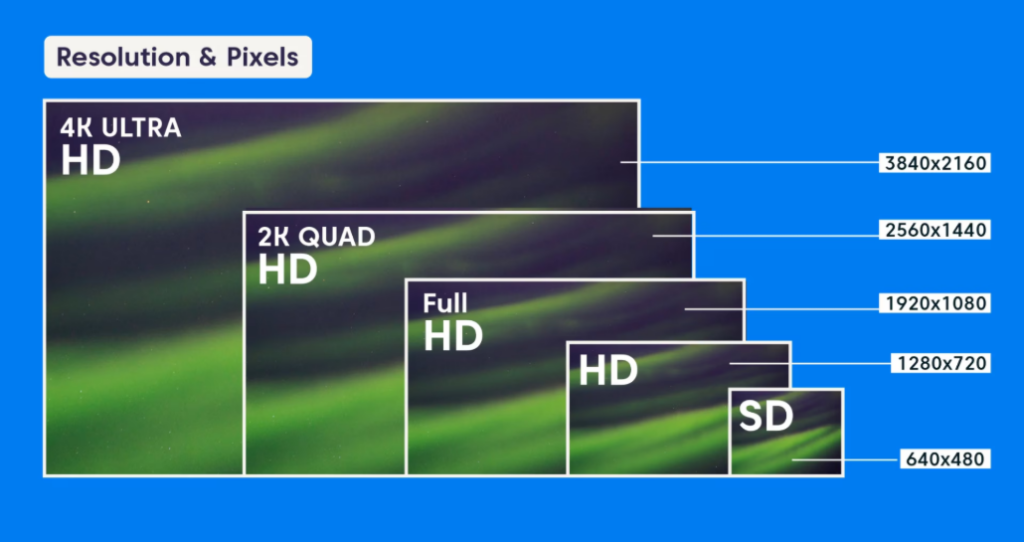
Target resolution can also be used in reverse. Instead of starting with an existing LED screen and calculating its resolution, you can start with the required resolution and determine approximately how large the LED display must be.
What Screen Size Is Needed for 1920 × 1080?
For a P2.5 LED display:
Width = 1,920 × 2.5 mm = 4,800 mm
Height = 1,080 × 2.5 mm = 2,700 mm
Therefore, a theoretical P2.5 LED display measuring approximately:
4.8 m × 2.7 m
can provide 1920 × 1080 pixels.
The exact commercial configuration may differ because cabinets are manufactured in standardized dimensions.
What Screen Size Is Needed for 3840 × 2160 4K?
The same principle can be used for 4K.
For P1.5:
3,840 × 1.5 mm = 5.76 m
2,160 × 1.5 mm = 3.24 m
So the theoretical screen size is approximately:
5.76 m × 3.24 m
For P2.5:
3,840 × 2.5 mm = 9.60 m
2,160 × 2.5 mm = 5.40 m
The required physical size becomes approximately:
9.6 m × 5.4 m
This demonstrates an important purchasing principle: the same target resolution can require dramatically different physical screen sizes depending on pixel pitch.
How Pixel Pitch Changes the Required 4K LED Screen Size
| Pixel Pitch | Approx. 4K Screen Size |
|---|---|
| P1.2 | 4.61 × 2.59 m |
| P1.5 | 5.76 × 3.24 m |
| P2.0 | 7.68 × 4.32 m |
| P2.5 | 9.60 × 5.40 m |
| P3.9 | 14.98 × 8.42 m |
These calculations are useful during early-stage project planning, but they should not be treated as final manufacturing specifications. Cabinet dimensions, module structure, aspect ratio, and controller limitations must be checked before production.
Can Any LED Screen Display 4K Content?
A common misconception is that an LED screen must have a native 4K resolution to display 4K content.
That is not necessarily true.
4K Content vs Native 4K LED Resolution
A 4K video source normally contains 3840 × 2160 pixels. An LED wall with fewer physical pixels can still receive that signal if its video processor supports the input.
The processor scales the source to the LED wall’s actual output resolution.
For example:
4K content: 3840 × 2160
LED wall: 1920 × 1080
The screen can accept and display the 4K source, but the final physical image is still limited to 1920 × 1080 pixels.
For premium applications, this distinction should be included in the technical specification and quotation. Otherwise, “4K support” can be misunderstood as “native 4K display.”
How Video Scaling Affects LED Image Quality
Scaling is useful when source and display resolutions do not match, but excessive scaling can affect image sharpness and fine detail.
A professional LED system should therefore consider:
- Input resolution
- Output resolution
- Scaling quality
- Aspect ratio
- Video processor capacity
- Content format
- Pixel mapping
The goal is not simply to accept the highest possible input signal. The goal is to create a clean relationship between content resolution, native LED resolution, and processing hardware.
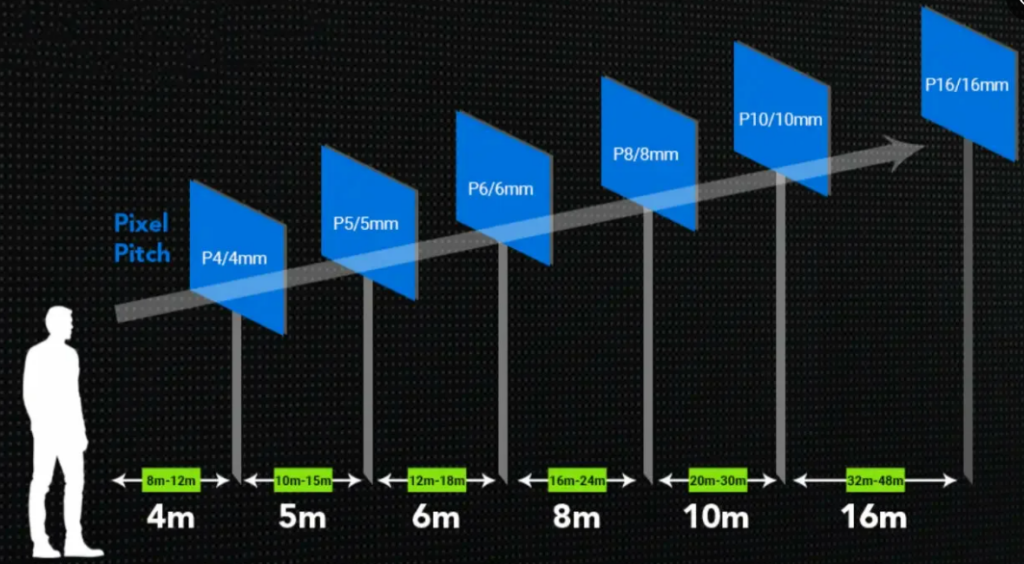
How Does Viewing Distance Affect the Resolution You Need?
Resolution should always be considered together with viewing distance.
An audience standing two meters from an LED wall can perceive substantially more pixel-level detail than an audience viewing a billboard from 100 meters away.
Why Pixel Pitch Should Be Selected Before Chasing Resolution
For indoor applications, a smaller pixel pitch can reduce visible pixel structure at close distances.
For outdoor advertising, the viewing distance is normally much greater, allowing a larger pitch such as P5, P6.67, P8, or P10 to remain visually effective.
The purchasing sequence should therefore be:
Application → Viewing Distance → Pixel Pitch → Screen Size → Native Resolution
rather than selecting a resolution first and forcing the entire project around it.
Choosing Pixel Pitch for Different Applications
Indoor conference room: typically requires a fine-pitch LED display because viewers are relatively close.
Retail showroom: pixel pitch should be selected according to the distance from customers and the desired visual quality.
Rental LED display: P3.9 and similar pitches are commonly considered for events where viewers may be positioned at different distances.
Outdoor billboard: larger pixel pitches can be appropriate because the audience is farther away and the screen is physically larger.
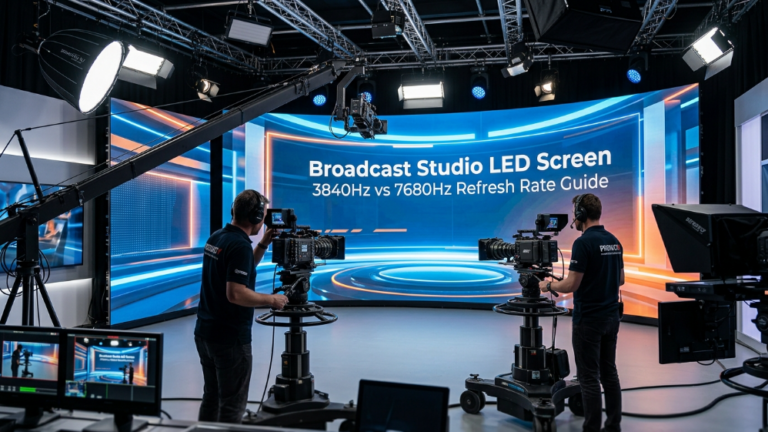
XR virtual production: pixel pitch is only one part of the specification. Refresh rate, grayscale, camera compatibility, scan behavior, and image processing are also critical.
How to Match LED Resolution With Video Processors and Content
Once native resolution has been calculated, the next step is verifying whether the control system can actually drive the display.
LED Controller Input Resolution vs Output Resolution
A video processor may support a specific maximum input resolution and output pixel capacity. The LED wall must remain within those limits.
For a large commercial display, engineers should verify:
- Maximum input resolution
- Maximum output resolution
- Total pixel-loading capacity
- Number of receiving cards
- Signal distribution
- Cabinet mapping
- Backup requirements
Sending Cards, Receiving Cards and Pixel Mapping
The sending system transmits image data to receiving cards distributed across the LED cabinets.
Pixel mapping determines how the incoming video signal corresponds to the physical pixels of the LED wall.
This becomes increasingly important as the screen grows larger or uses an irregular configuration.
For a multi-cabinet LED video wall, correct mapping helps prevent:
- Misaligned images
- Reversed cabinets
- Missing sections
- Incorrect aspect ratios
- Signal-loading problems
What LED Screen Resolution Do Different Applications Need?
There is no universal “best” resolution. The appropriate specification depends on the project’s environment.
LED Billboard Resolution for DOOH Advertising
DOOH billboards prioritize visibility, brightness, viewing distance, reliability, and operating cost. A very fine pixel pitch is not automatically necessary.
The correct resolution should support clear advertising content while maintaining an economically sustainable pixel density.
LED Wall Resolution for Conferences and Corporate Rooms
Corporate environments generally place viewers much closer to the display. Fine-pitch LED technology can therefore provide better perceived image quality.
Content such as presentations, spreadsheets, video calls, and detailed graphics also benefits from higher pixel density.
LED Screen Resolution for XR Virtual Production
XR applications require more than simply calculating total pixels.
A professional XR LED wall should also be evaluated for:
- High refresh rate
- High grayscale
- Camera compatibility
- Low scan distortion
- Moiré control
- Stable color performance
- Precise image processing
For camera-based applications, a high-quality LED system must be designed around the entire imaging chain rather than resolution alone.
Common Mistakes When Calculating LED Screen Resolution
Confusing 4K Input With Native 4K
Always distinguish between the resolution a controller accepts and the physical resolution of the LED wall.
Ignoring Cabinet and Module Dimensions
A theoretical screen size may not correspond to a manufacturable cabinet arrangement. Always verify the actual cabinet pixel dimensions.
Choosing Pixel Pitch Without Considering Viewing Distance
A smaller pitch can increase cost without delivering a meaningful visual advantage if viewers are far from the screen.
Assuming Higher Resolution Always Means Better ROI
For commercial projects, the best specification is the one that satisfies the visual requirement without unnecessary hardware expenditure.
How to Choose the Right LED Screen Resolution Before Requesting a Quote
Before contacting an LED display manufacturer, prepare at least these six project parameters:
- Screen width and height
- Minimum and typical viewing distance
- Application environment
- Required content resolution
- Target pixel pitch
- Installation and cabinet constraints
The supplier can then calculate the theoretical resolution and verify it against the actual LED module, cabinet resolution, processing system, and complete cabinet array.
For B2B projects, this verification step is essential. A reliable LED display solution should provide not just a resolution number, but a complete technical configuration that connects pixel pitch, native resolution, viewing distance, controller capacity, brightness, refresh rate, and application requirements.
The practical objective is simple: calculate the resolution first, verify the physical configuration second, and select the specification based on the project’s real viewing and operating conditions.
Price Note
LED screen pricing can vary significantly depending on pixel pitch, screen size, cabinet configuration, LED package, brightness, refresh rate, control system, installation requirements, shipping terms, and project quantity. The calculations in this guide are intended for technical planning and should not be treated as a fixed quotation. For an accurate project price, buyers should confirm the final screen dimensions, pixel pitch, application, viewing distance, cabinet configuration, and required technical specifications with the LED display manufacturer.
References:
NIST — Resolution and Pixel Measurement
The Open University — Representing Images in Binary