FAQ

The FAQ provides detailed information about LED product features, common questions and answers about LED, as well as purchasing considerations for LED, aiming to provide you with a comprehensive understanding and guidance.

How to send content to led display

Login from sostron.com,then follow the step to upload media content,create content and publish to the content.
send content to led display

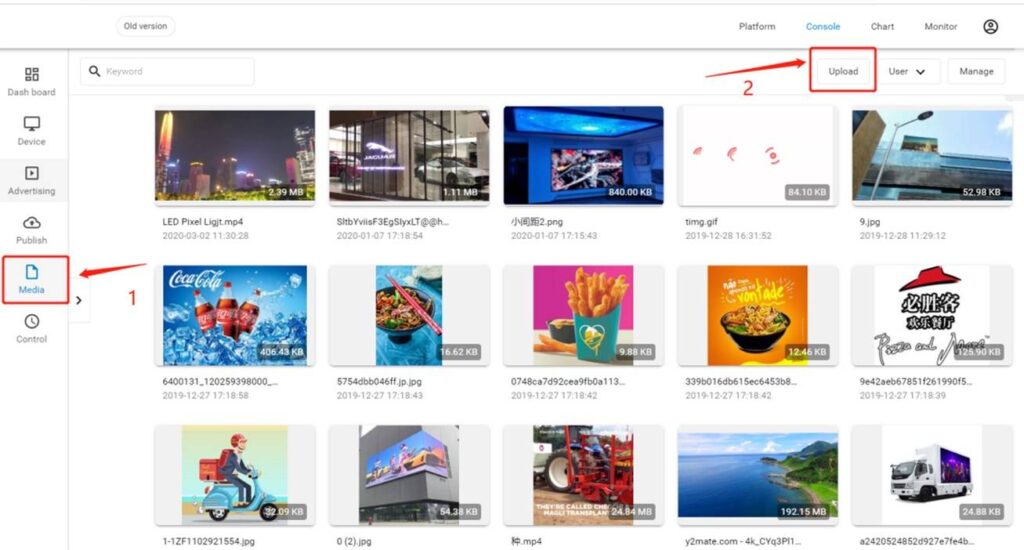
Step 1. Upload media content

Find [Console]-[Media]-[upload], then choose your content

mp4 and jpg are recommanded video and image format.
send content to led display

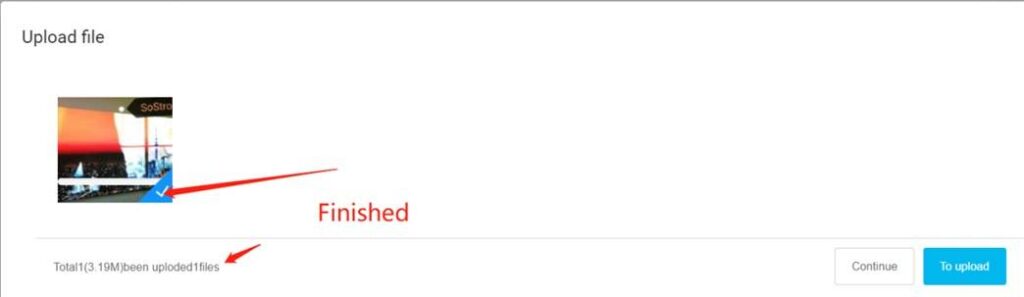
When you see this sign,that means the content is been uploaded to cloud.
uploaded to cloud

Step 2. Create media content

Go to [Advertising] on the left side after uploading the files, then click [Make] to start to create advertising process.
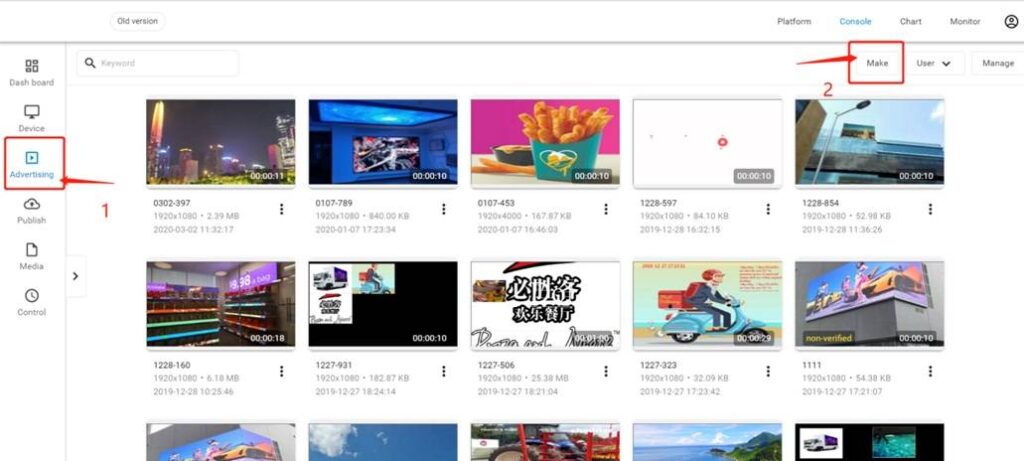
Create media content

Drag and drop content type (icon on the left side) to the display area,double click to add content to it,then add more to it.
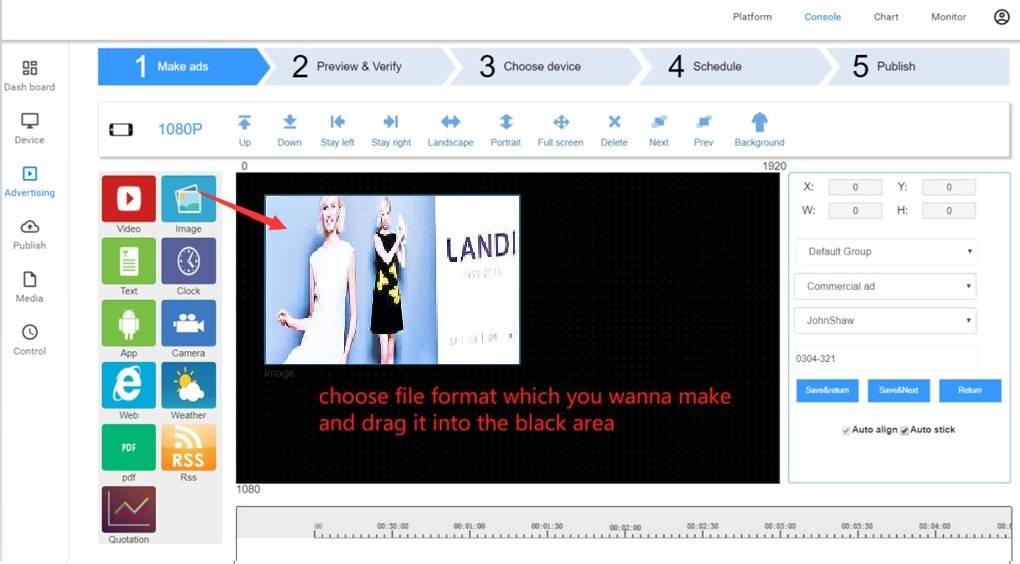
Create media content

You can edit resolution,name and group from right side.

You can make Horizontal and Vertical template.

Resolution can be 1080P,720P,480P or customized.

Do not make more than 2 HD video at the same time,it might not play smoothly.

Then Save&Next
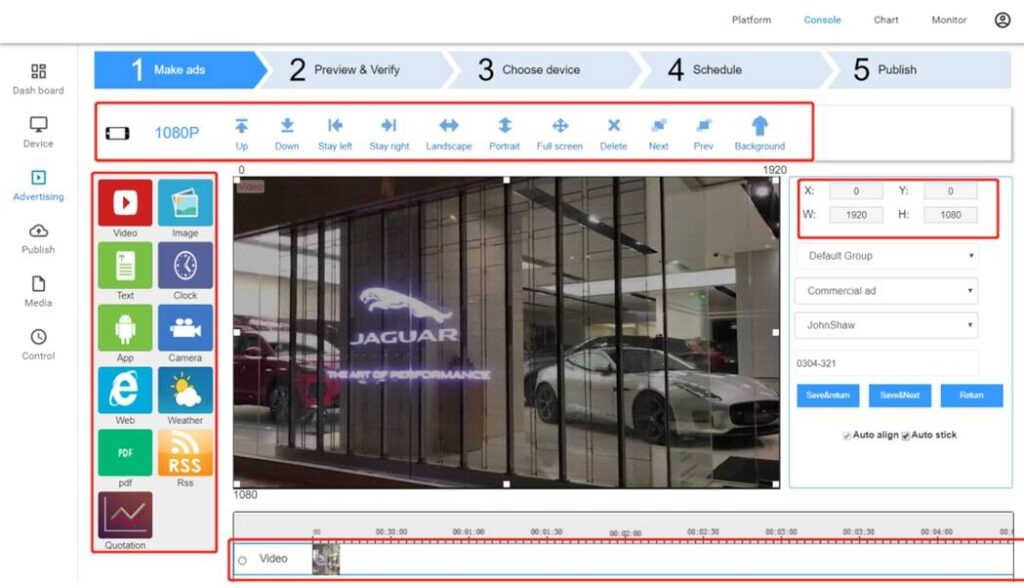
play smoothly

You can go to [setting]-[verify] to open/close the verify process for safety reason.If it’s on,find verify process from [Message] list.
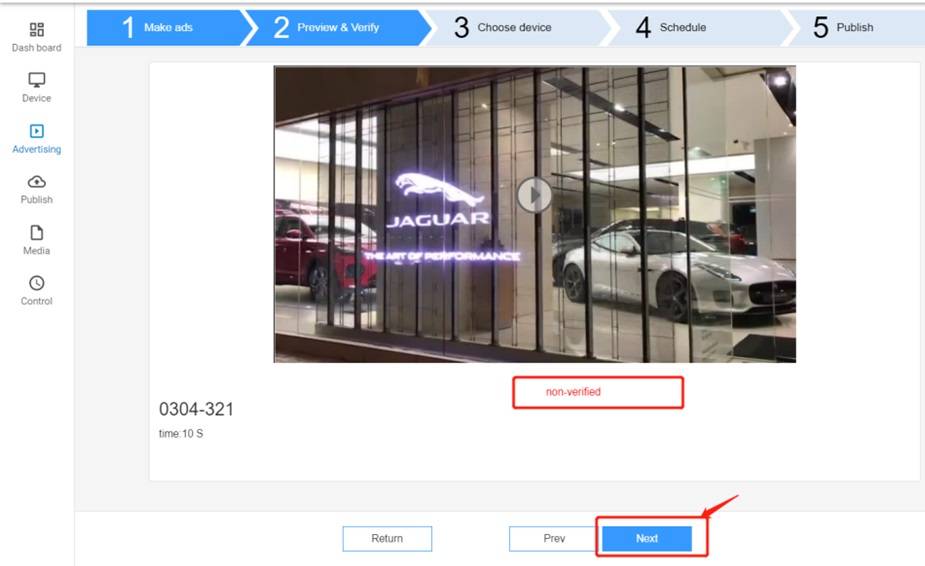
Publish content

Step 3. Publish content

Choose devices which you wanna to play the content,can choose as much as you need,then [next].
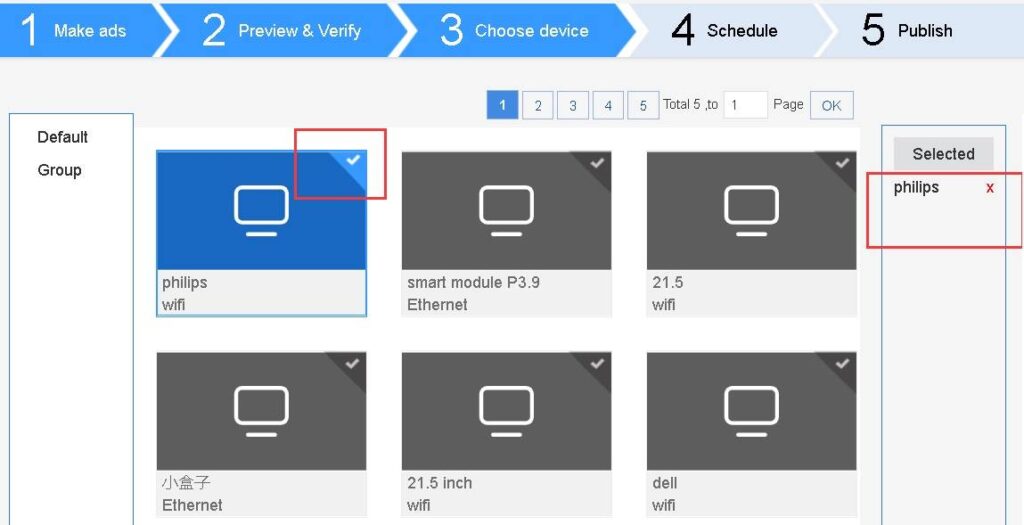
led display

Choose your play schedule type

Freetime ‐ When there’s no other play schedule,it will be played in a loop.

AI play ‐ With face recognition,different audience age/gender will play different content automaticlly.

Ontime ‐ Play it based on your time schedule,you can add more to your list.
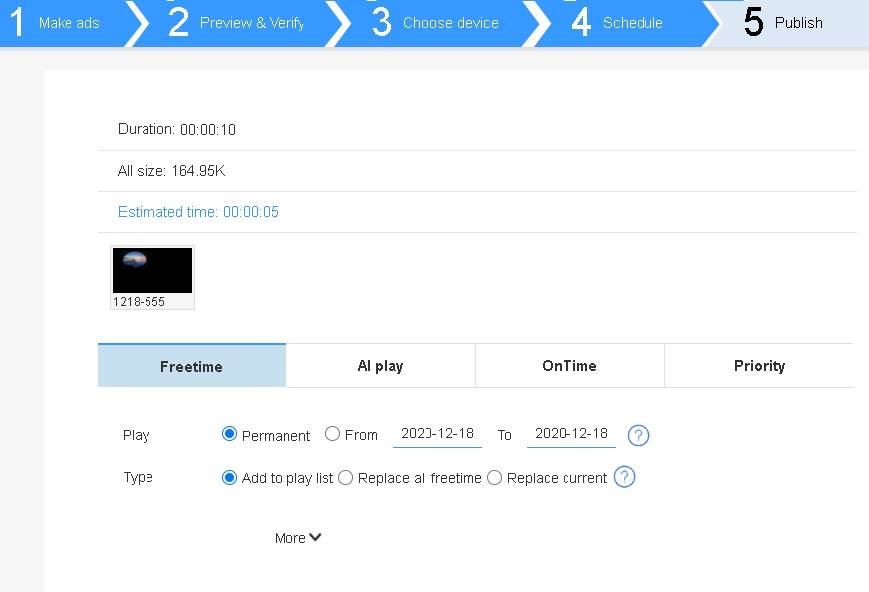
led display

Priority – Advertising will be played now as priority for one time.
led display

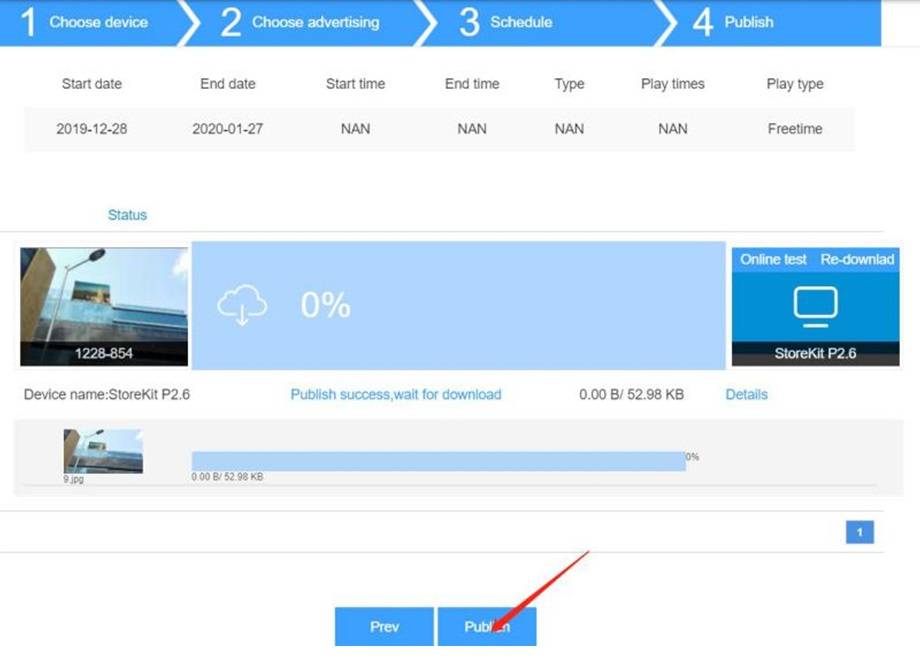
Double check the publish information,and click [publish]
led display

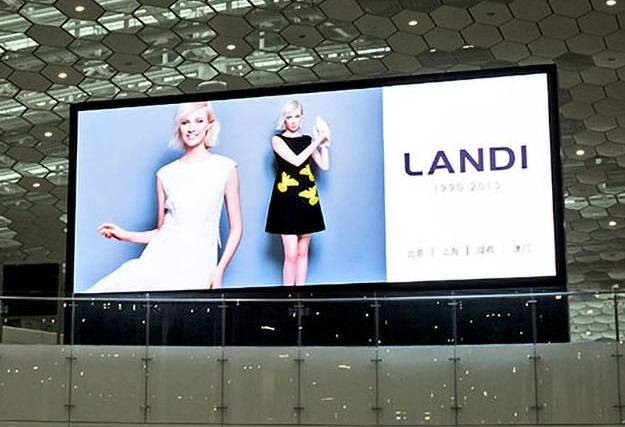
After download finish,you should see content play on the led display.
share this post

Related Posts

What Is the Difference Between Pixel Resolution and Pixel Density
What Is Pixel Resolution? 7 Key Facts About 4K & 8K
what is 4K resolution
What Is 4K Resolution? 5 Key Facts for LED Displays
Energy Saving Outdoor LED Billboard- Ares 3
Commercial LED Display Cabinet Size: 4 Types Explained
Flexible LED Screen Colombia
Flexible LED Screen Colombia: 9 Things Buyers Must Know
Medellín LED Advertising Screen Price
Medellín LED Advertising Screen Price: 7 Costs to Know

Send a Message

document.addEventListener("DOMContentLoaded", function() { function updateWhatsAppLinks() { var path = window.location.pathname; var defaultText = "Hello Sostron, I am interested in quoting an LED display from your website (Web EN)."; var customText = defaultText; if (path.startsWith('/es/')) { customText = "Hola Sostron, me interesa cotizar una pantalla LED desde la web en español (Web ES)."; } else if (path.startsWith('/fr/')) { customText = "Bonjour Sostron, je souhaite un devis pour un écran LED depuis le site français (Web FR)."; } else if (path.startsWith('/it/')) { customText = "Buongiorno Sostron, vorrei un preventivo per un ledwall dal sito italiano (Web IT)."; } else if (path.startsWith('/pt/')) { customText = "Olá Sostron, gostaria de um orçamento de painel LED pelo site em português (Web PT)."; } var waLinks = document.querySelectorAll('a[href*="wa.me"], a[href*="api.whatsapp.com"]'); waLinks.forEach(function(link) { var rawHref = link.href; if (rawHref.includes("wa.me/")) { var phonePart = rawHref.split("wa.me/")[1].split("?")[0]; var newHref = "https://wa.me/" + phonePart + "?text=" + encodeURIComponent(customText); if (link.href !== newHref) link.href = newHref; } else if (rawHref.includes("api.whatsapp.com/send")) { var match = rawHref.match(/phone=([^&]+)/); if (match) { var phoneNum = match[1]; var newHref = "https://api.whatsapp.com/send?phone=" + phoneNum + "&text=" + encodeURIComponent(customText); if (link.href !== newHref) link.href = newHref; } } }); } // 1. 页面加载完立即执行一次 updateWhatsAppLinks(); // 2. 开启全局监视:防止悬浮按钮是后续异步加载出来的 var observer = new MutationObserver(function(mutations) { updateWhatsAppLinks(); }); observer.observe(document.body, { childList: true, subtree: true }); });